Key Highlights
- Tangled cables can block airflow and push equipment to run hotter.
- Bundling power and data lines too closely may lead to signal interference.
- Poorly labelled cabling makes troubleshooting slower and more frustrating.
- Cable strain and sharp bends can wear down connectors and ports over time.
- Regular audits and a clear labelling system help keep things under control.
Why Proper Cable Setup Matters
Most people don’t give much thought to the cables running behind their servers, switches and workstations. As long as everything powers on, it’s easy to assume all is well. Cable tidying tends to sit at the bottom of the to-do list. But IT cable management plays a bigger role in how your equipment performs than many realise. Tangled, overcrowded or poorly routed cables can quietly create problems – from heat build-up to connection drops – that only become obvious once something fails. In this article, we’ll look at how poor IT cable management affects your hardware, and what you can do to keep things running smoothly.
Blocked Airflow and Rising Temperatures
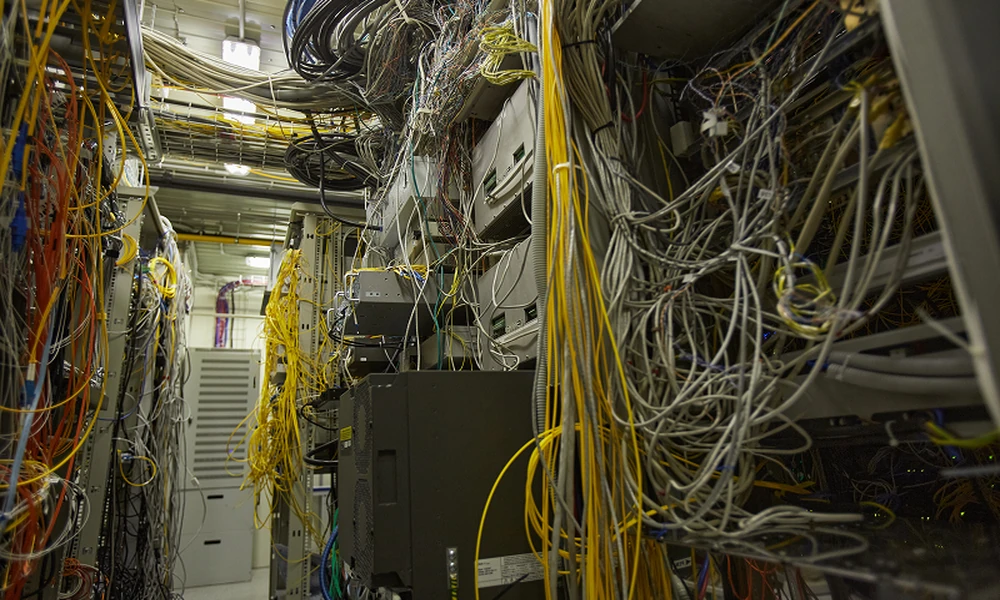
IT equipment needs steady airflow to stay within safe operating temperatures. When cables are bunched up behind racks or stuffed into tight spaces, they can block the vents and fans that push hot air out. Over time, this can cause components to run hotter than they should.
Higher temperatures can lead fans to work harder, and in some cases, devices may throttle their performance to protect themselves. Sustained heat can also shorten the lifespan of parts like power supplies and hard drives. Good IT cable management keeps cables routed along the sides of racks and away from intake and exhaust points, giving air a clear path to move through.
Signal Interference and Connection Issues
Not every performance problem comes down to hardware faults. Sometimes, the way cables are laid out is the real cause. Here’s a quick look at some common culprits and what they can lead to:
| Cabling Issue | What It Can Cause |
| Power and data cables bundled together | Electromagnetic interference that disrupts data signals |
| Cables bent too sharply | Damaged internal wires and weaker connections |
| Runs beyond recommended lengths | Signal loss, particularly on copper Ethernet |
| Loose or strained connectors | Intermittent drops that are hard to trace |
Careful IT cable management – separating power from data lines, respecting bend limits and keeping runs within spec – helps reduce these risks and keeps your network more stable.
Slower Maintenance and Longer Downtime
Picture this: a switch port fails, and your technician needs to trace a single cable through a wall of identical grey wires. Without labels or a clear layout, what should be a quick fix can drag on far longer than necessary.
Messy cabling also increases the chance of accidents during maintenance. Pulling one cable loose from a tangled bundle can easily disconnect another, causing unplanned outages for other users and requiring extra IT solutions. That’s extra downtime nobody asked for.
Structured IT cable management, with colour-coded cables, clear labels and an up-to-date cable map, makes it easier to find what you need. It also means new staff or outside contractors can get up to speed without relying on memory.
Simple Steps to Get Your Cables in Order
The good news? You don’t need a full overhaul or a big budget to see a difference. A few practical habits go a long way:
- Label both ends of every cable so it’s easy to identify at a glance.
- Keep power and data cables on separate paths where possible.
- Use hook-and-loop ties rather than zip ties, since they’re easier to adjust and less likely to pinch cables.
- Choose cable lengths that fit the job to avoid excess slack.
- Schedule regular audits to remove unused cables and update your records.
Treat IT cable management as an ongoing task, not a one-off job, and it becomes much easier to keep on top of as your setup grows.
Securing Long-Term Hardware Health
Cables may not be the most exciting part of your IT setup, but they have a direct effect on how well your equipment runs. Blocked airflow, signal interference and slow repairs all add up, often without anyone noticing until a problem surfaces. A tidy, well-documented setup makes your hardware easier to cool, maintain and expand as your needs change. Spending a little time on cable organisation now can save you from bigger headaches later.
Contact A-ChieveMent Solutions to talk through your current cabling setup and find out how we can help you organise, label and maintain it for the long run.